Satellity

When and where to look up.

Satellity tells you when a satellite is worth going out for, and guides you until you find it.

Satellity: Satellite Tracker

Free · iPhone and iPad

Coming soon to the App Store
Watch the 30-Second Tour

Up there, it’s still daytime.

After sunset, the sky above you is dark, but a few hundred kilometers up the Sun is still shining. A satellite catches that sunlight and glows like a moving star. When it enters Earth’s shadow, it fades out.

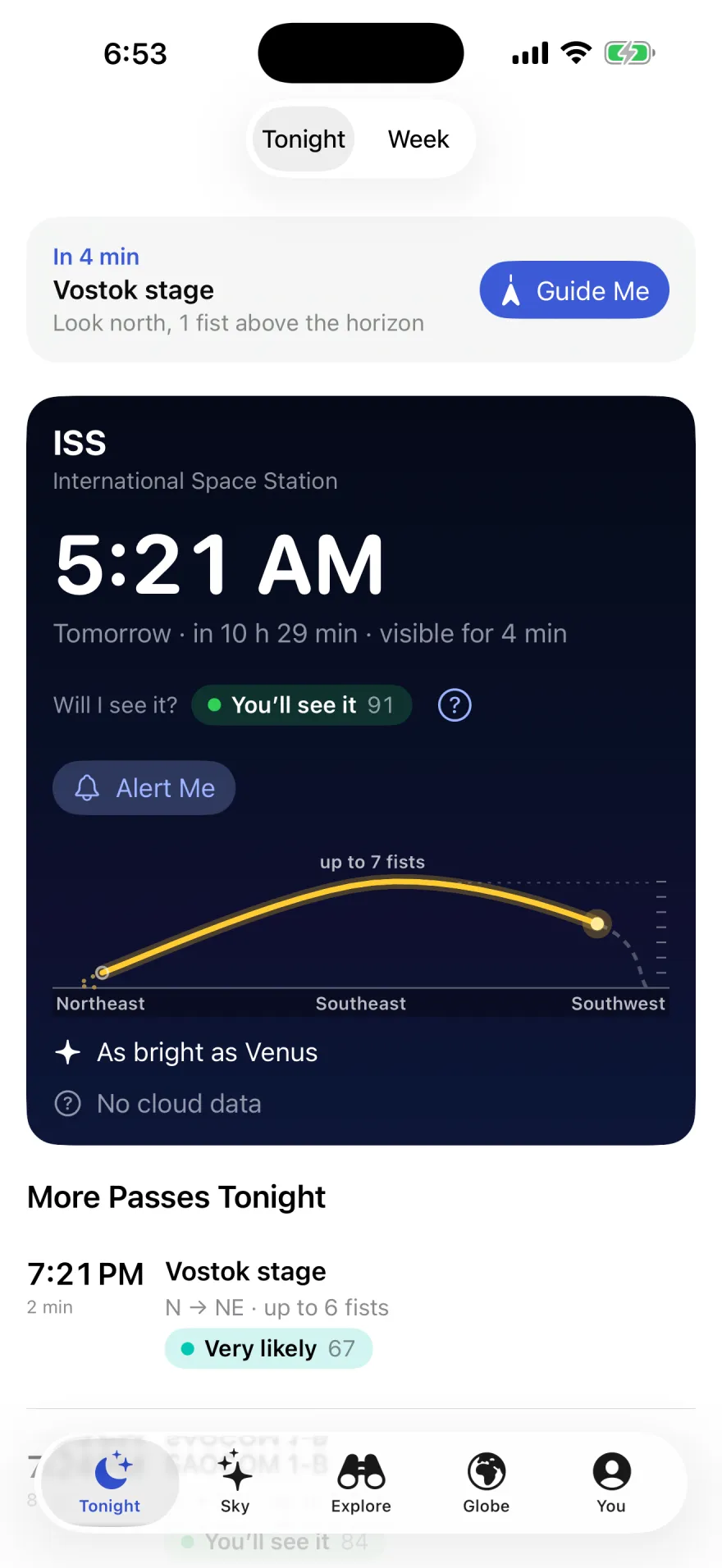
The Tonight card for the ISS: 5:21 AM tomorrow, visible for 4 minutes. Will I see it? You’ll see it, 91. An Alert Me button, and the pass drawn as a gold arc from the southwest, up to 7 fists in the southeast, to the northeast. As bright as Venus. No cloud data.

Know when to look, and where.

One question first: is anything worth going out for tonight? If there is, Satellity answers the next four. If nothing is worth it, it says so and shows you the next good night.

The ISS one night in October, as Satellity told it:

Where?
Lights up in the southwest as it leaves Earth’s shadow. Drops out of sight in the northeast.
How high?
4 fists above the horizon, climbing to 7
From the horizon to straight overhead is about nine fists. A satellite 3 fists above the horizon is about 30° up. 1234567893 fists upstraight overheadhorizonyou

A fist at arm’s length is about 10°. Satellity puts directions into words and height into fists: “Look northwest, 3 fists above the horizon.” Brightness is compared with things you know: “As bright as Venus.” “As bright as Polaris, the North Star.”

Every pass answers “Will I see it?”

A score from 0 to 100 weighs how bright the satellite will be against your sky, how high it climbs, how long it stays visible, and the cloud forecast. “Why this score?” tells you what counted.

  1. You’ll see it80–100

    It’s plenty bright and passes high: with a clear sky, you’ll see it.

  2. Very likely60–79

    You’ll most likely see it if you look where and when Satellity tells you.

  3. Possible40–59

    It can be seen, but you’ll need a dark sky and some patience.

  4. Unlikely20–39

    Borderline: it’s faint, passes low, or there’ll be clouds. For those who already know how to look.

  5. Almost impossible1–19
  6. Not visible0

What Goes Into It

Brightness Against Your Sky
How bright the satellite will be, against a sky that twilight, light pollution, and the Moon all brighten.
Height and Time
How high it climbs, and how much of its time above 1 fist it spends in sunlight. Low passes lose to buildings and haze; passes that fade early score less.
Clouds
The hourly forecast from Apple Weather. With no forecast, the score leaves clouds out and the app says “No cloud data,” so check the sky yourself.

The Moon Counts

On a suburban night, a full Moon 50° high and 20° away from a magnitude-2 satellite that passes 60° up drops that pass from 88 to 60. The ISS, far brighter, stays at 100.

What’s your sky like?

Under city lights, only the brightest satellites show. Tell Satellity which sky you have, and the score follows.

  • City Only the brightest stars
  • Suburbs The Big Dipper and little else
  • Countryside You can see the Milky Way

How It’s Measured and Checked

Brightness Measured by a Telescope

The brightest, like the ISS, Tiangong, and Hubble, have well-known brightness. Many others come from the Mini-MegaTORTORA telescope, which has measured about 11,000 objects; the app uses those measurements with its authors’ permission. Many of the rest are estimated from their size and mass, and the app tells you when a brightness is an estimate, or when it doesn’t know it.

Karpov et al. (2016), RMxAC 48, 112 · Beskin et al. (2017), Astrophys. Bull. 72, 81 · Sizes: GCAT, J. McDowell
The Automatic Alert Waits for a Known Brightness

It picks the best pass of each night, only when it’s “Very likely” or better, and only for satellites with a known, steady brightness. If tonight’s only good pass is an estimate, you get no automatic alert rather than a false promise.

Checked Against Skyfield

Pass predictions are tested against Skyfield, a reference astronomy library. With the same orbital data:

Rise and set times
under 1 ms
Transits, closest approach
1.3″
Transits, center line
27 m
Frame crossings, tripod
3.8 ms

Out in the real world, timing also depends on how fresh the orbit is: with orbital data a few days old, the ISS can be a few seconds early or late. The app shows how old its data is. Orbits: USSPACECOM via Space-Track.org.

A guide until you find it.

You’re reading this part of the page in Night Mode (Red). Your eyes take about 20 minutes to get used to the dark, and a white screen undoes it in seconds, so at night the app turns red; it can switch on by itself when the guide opens.

From the alert to the moment it appears, Satellity talks you through it, in words and in fists.

The guide during a pass, in Night Mode (Red). The compass in this recording is scripted.

  1. The Alert

    ISS passes in 5 minutes

    Look west, 1 fist above the horizon, at 9:33 PM. Tap and I’ll guide you.

    It arrives 5, 10, or 15 minutes before, your choice. Tap Alert Me on any pass, or let the app alert you about the best pass of each night.

  2. On Your Lock Screen

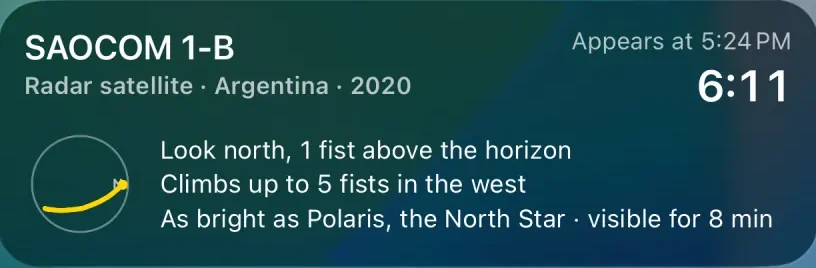
    Satellity’s Live Activity for SAOCOM 1-B: appears at 5:24 PM, a countdown of 6:11, a small sky dial with the path, “Look north, 1 fist above the horizon,” “Climbs up to 5 fists in the west,” “As bright as Polaris, the North Star, visible for 8 min.”

    A countdown on the Lock Screen and in the Dynamic Island: where to look, how high, how bright, and a small drawing of its path. The Next Pass widget (Home Screen, Lock Screen, or StandBy), Siri, and Control Center pick the same pass of the night as the app.

  3. Guide Me

    A full-screen countdown, an arrow that tells you which way to turn, and how many fists to look up. Aim the phone like a flashlight, top edge first. When you’re pointing at it while it’s up, it says There it is! Look above your phone.

  4. “Did you see it?”

    Two minutes after an alerted pass, it asks. Your answers build a small log of what you’ve seen, and they stay on your device.

Sound Guide

Look at the sky, not the screen. A sonar beeps faster and higher as you get closer, and a voice counts down the moments. With headphones, the sound comes from the side you need to turn to.

The Sonar, Ping by Ping
Ping by ping, from the app’s own formula.

The sky right now.

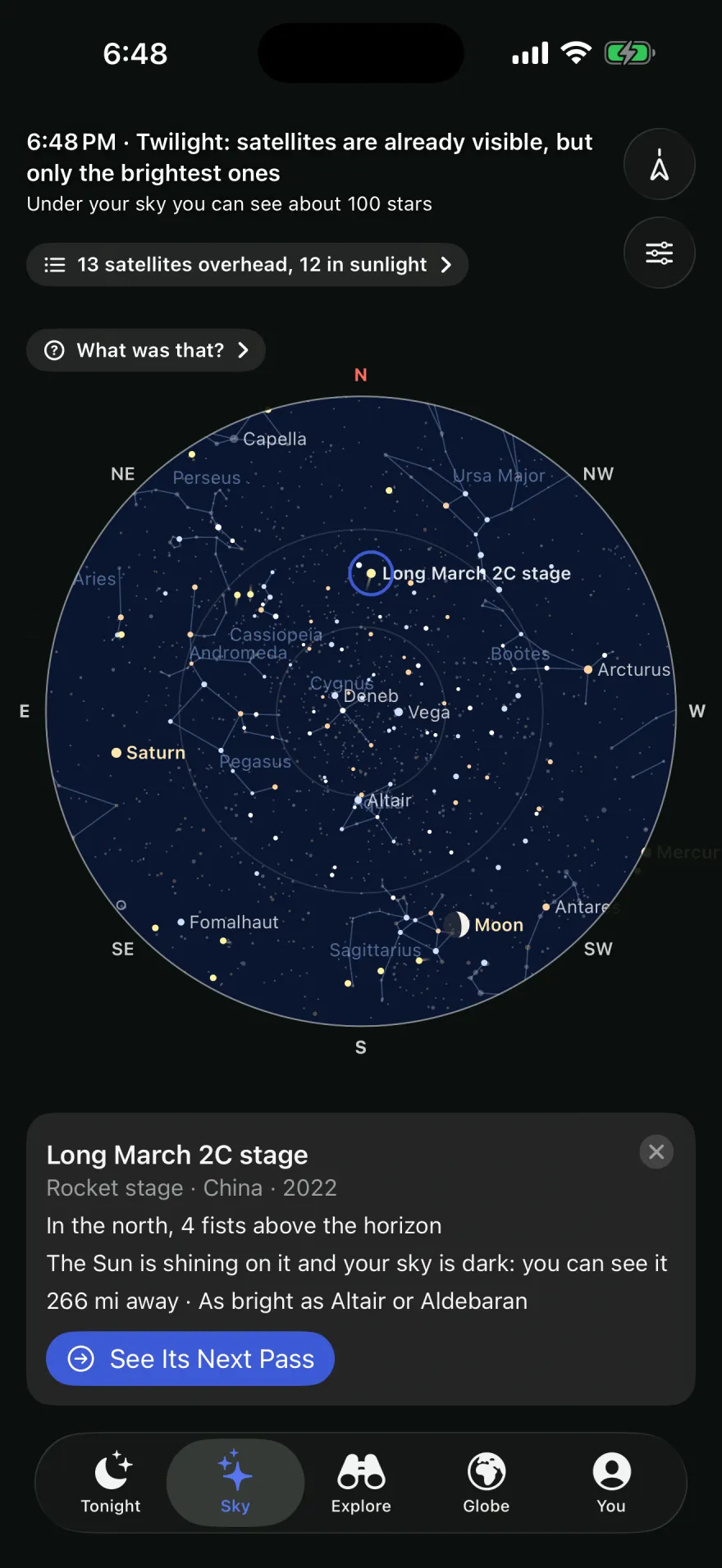
Stars, constellations, the Moon with its phase, the planets, and the satellites moving over you. Point your phone and the map follows you.

8,406 stars from the Yale Bright Star Catalogue and all 88 constellations, drawn as seen looking up: facing south, east is on your left, the way the sky really is.

“What’s overhead?”

A live list of the satellites above you right now: the ones you can see, and for the others, why not.

  • Visible now: “The Sun is shining on it and your sky is dark: you can see it”
  • “The Sun is shining on it, but your sky is still bright”
  • “In Earth’s shadow”
  • “Very low: buildings and haze get in the way”
  • “Too faint for your sky”
The Sky tab at 6:48 PM: “Twilight: satellites are already visible, but only the brightest ones.” A round star chart with constellations, the Moon and Saturn. Long March 2C stage is selected: in the north, 4 fists above the horizon, the Sun is shining on it and your sky is dark, you can see it.

Earth, Sun, and Moon, where they are.

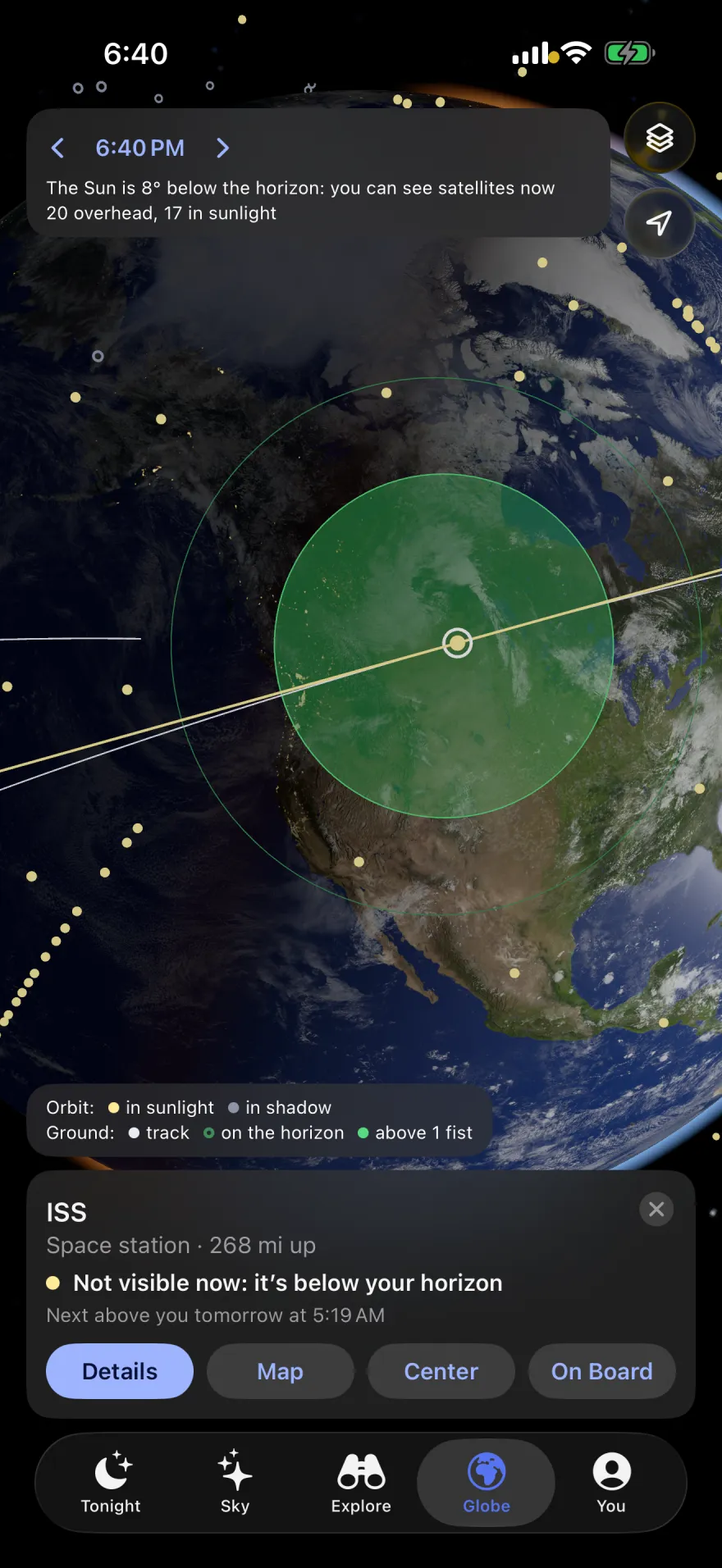
A live globe with day and night, and the satellites the app knows, colored by the one thing that matters to you: whether you can see them right now.

  • Visible now. Above your horizon, in sunlight, with your sky dark.
  • In sunlight. The Sun is on it, but you can’t see it from where you are.
  • In Earth’s shadow. Switched off, like the satellite in the drawing at the top.
  • You. Where you stand.

Shown with The Whole Catalog on the Globe, a Satellity Pro layer. The free globe draws the satellites the app knows and the geostationary belt.

The globe over North America at dusk with the ISS selected: its orbit, the green zone it can be seen from, and a card: “ISS, Space station, 268 mi up. Not visible now: it’s below your horizon. Next above you tomorrow at 5:19 AM.”
Tap a dot and the card answers first whether you can see it.

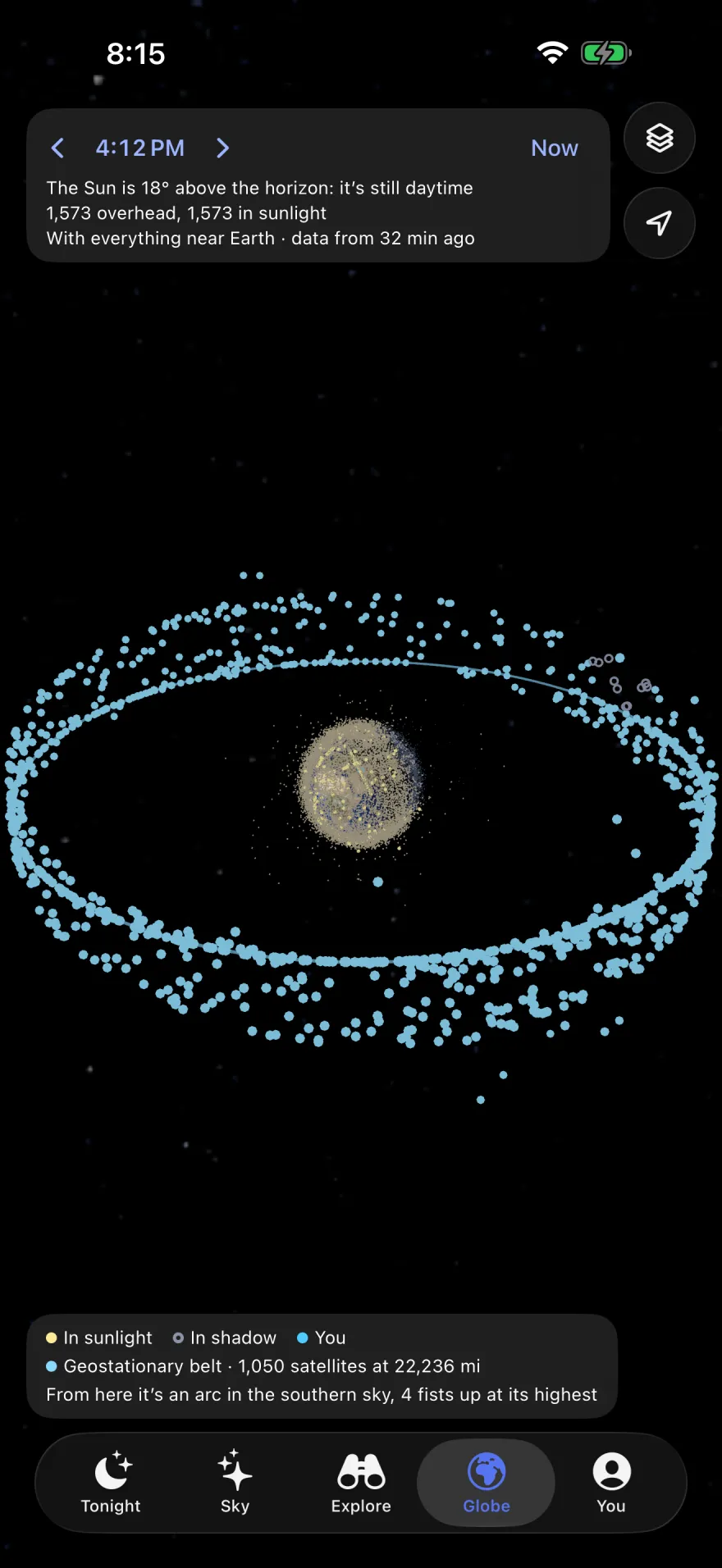
Tap any satellite to draw its orbit, sunlit and in shadow, its ground track, and the zone it can be seen from. One pinch takes you from close to Earth out past the geostationary belt, 35,786 km (22,236 mi) up.

After a pass, See Why It Faded shows it from space: the satellite’s path, where you stood, and the shadow it flew into.

The geostationary belt: a small Earth inside a tilted ring of light-blue dots. “From here it’s an arc in the southern sky, 4 fists up at its highest.”
The geostationary belt, and where it sits in your sky.

The ISS, launches, and reentries.

Search tens of thousands of objects in orbit and read names a beginner understands, each with its next passes, where it is now, and what it is.

Names That Make Sense

CZ-2C R/B, in Satellity: Long March 2C stage

COSMOS 1408 DEB, in Satellity: Debris from Cosmos 1408

Space Stations

Where the ISS and Tiangong are right now, the country or ocean below them, and who is on board.

Launches

Upcoming launches with a countdown, and the last 30 days’ launches linked to the satellites they carried.

Reentries

What will fall back to Earth soon, with its honest window of uncertainty. The app doesn’t guess where it will come down.

The essentials are free.

Passes, “Will I see it?”, every pass alert, the Live Activity, widgets, the guide, Night Mode (Red), the sky map, and “What’s overhead?” are free, and they don’t expire. There are no ads, with or without Pro.

SatellityPro

Everything in orbit, from on board and over the real sky.

Optional, and it arrives with the app: one week free, then yearly, or a one-time purchase. It works with Family Sharing.

All Starlink on the Globe
Thousands of satellites moving at their real positions.
The Whole Catalog on the Globe
Everything near Earth, on the globe.
See Earth from the ISS
Ride aboard the ISS or any satellite and watch Earth go by below you.
What was that?
Find out what that moving light in the sky was.
Sky Camera
The sky and the pass, drawn over the camera view.
Transits Across the Sun and Moon
Where to stand to see the ISS or Tiangong cross the Sun or the Moon.
Satellites in Your Frame
Which satellites will cross your photo, when and where, and when none will.
Alerts for Any Satellite
Follow any object in the full catalog and get an alert before its passes with good odds.

What each Pro feature does

Your sky stays on your device.

No accounts, no ads, no tracking.

  • Passes are computed on your iPhone or iPad, and alerts are local notifications your device schedules. Your location never leaves it, except to ask Apple Weather for the cloud forecast.
  • The camera and motion sensors are used only live, to know where you’re pointing; no image is saved or sent. The app only downloads public files, like orbits, launches, and crews, that carry nothing that identifies you.
  • Purchases are handled by Apple and verified on the device: we never see payment details. The app’s own maps never zoom in closer than 1,000 km (620 mi), so Apple is never asked for the map of your neighborhood.

This page, too: no cookies, no analytics, nothing loaded from anyone else.

Full darkness. Look up.

Coming soon to the App Store, for iPhone and iPad, in English and Spanish.

Watch the 30-Second Tour